
Programming your Arduino with an AVRISP mkII with the new 1.0 IDE
A while back a wrote up instructions on how to program an Arduino with an AVRISP mkII.
Back then the current software for the Arduino IDE was set at 0022 and it required you to modify a file to get it work.
Apparently enough people wanted a feature like that to come built into the Arduino IDE that it has now become reality. No more modifying of files.
It’s extremely easy to do know and I’ll show you exactly how to do it, so go ahead and fire up the Arduino IDE, plug in your programmer (I’m still using an AVRISP mkII) and plug up your Arduino Uno to an external supply and to your programmer.
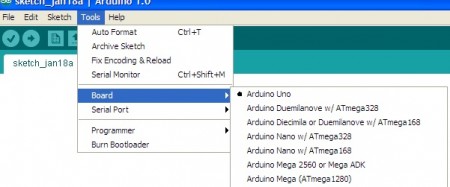
First select which board you plan on using:
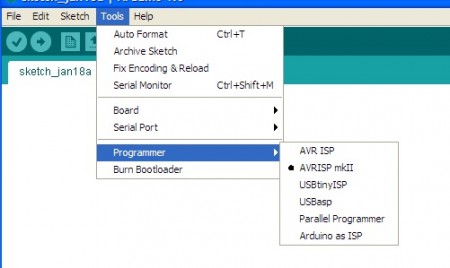
Next select the programmer you plan on using:
Lastly, when you are ready to upload your sketch to your Arduino, hold the the shift key when you push the upload button. You’ll notice the words change when you hover your mouser over it while hitting the shift key.
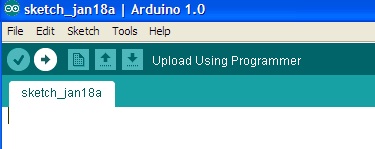 That’s it! Simple as pie. Using this method you will bypass the Arduino bootloader, freeing up some flash memory as well as avoiding the initial startup sequence that needs to be used for the tradition sketch upload.
Update: 6/25/12
Here is the driver I use on my computer so that the AVRISP connects correctly and can be used by the Arduino IDE to program your board or burn the bootloader. Save it, and unzip it. It is a dll file. To use, go into the device manager and find AVRISP (not sure what it may be called in your system), and update the driver for it using the one I provided (it’s also buried in the Arduino folder). Normally its the device with the yellow exclamation symbol if it has no current driver.
The driver I have is not digitally signed, but you should be able to navigate through the error message and force it to update.
Tried the above on my own hardware which was based on the NANO and it dosent work?
Any ideas?
Describe your setup to me? Are you using the new Arduino 1.0 IDE software? This feature isn’t included in any of the older IDE versions.
yes i am using the Arduino 1.0 IDE software. I have designed my own board using the NANO as a base. So the processor section is identical. Basically I need to claw back the extra program space used by the bootloader for my software. I have followed your instructions and have got it to upload via the usb by editing the board.txt and preference.txt files. But i want to dump the USB loading part of my circuit and load the software via AVRISP MKII. it keeps looking for a usb connection.
With the Arduini 1.0 IDE, you don’t need to modify any files. Also, make sure you have all the proper drivers installed for the AVRISP.
Basically hook up your AVRISP via USB to your computer, hook up an external power supply to the Arduino and hook up the ribbon cable from the AVRISP to the 6 pin ICSP header you should have somewhere on the board. Also, make sure it’s in the correct orientation as well. Where the pin 1 (red strip on ribbon cable) connects to is important.
If possible, upload a pic of your setup to a photo sharing site and post the link to it so I can have a look. It’ll be easier to advise you if I know what you’re working with.
Thank you for your fast update!
On my setup (Official Arduino Uno) it works perfectly and very fast.
Thank you for you excellent tutorial!
Robert
No problem! Glad you got it all working.
Thanks for taking the time to post this. I almost started editing my “boards.txt” file, until I read through the comments on your old post and was directed to come here (found you on google)
I was hoping it was this easy — I sent some schematics off to the factory to be made in to PCBs with a 2×6 header hooked up to SPI on the AVR. I kinda guessed at this… and you confirmed I was right. Just tried it out on an unprogrammed, unbootloaded Atmega368P mounted on a breadboard right out of the box that i got from Mouser. This worked the first try — and on a Mac too.
Love it! Plus, no more waiting the 2 seconds for the chip to boot up either. Love the option of not having to have a boot loader and at the same time get all the benefits of the Arduino libraries.
Glad it worked out for you!
Thanks for the instructions! I did not know that you can use to program the Arduino IDE 🙂
National characters removed from my name :/
When I go through the procedure I get the message, “avrdude: usbdev_open(): did not find any USB device “usb”.” Does this procedure only work with a device without a bootloader? Also, I’m not sure if there is a driver installed for the AVRISP mkII. I’m using a UNO and Arduino 1.0.
Any help is appreciated.
You’ll definitely need a driver for the MKii if you never installed one.
A driver is included in the Arduino folder. I’m away from my computer at the moment and I’ll post the location of the driver tomorrow.
In the meantime, check out the link toward the beginning of this post. It’ll take you to an older article (for the days before the 1.0 software). See Note 2 at the bottom of that post. I had posted the location of the driver for the older software. I’d imagine they kept it the same for this newer software.
I get the same message as Tony Goodloe: avrdude: usbdev_open(): did not find any USB device “usb”
(using Arduino ISP 1.0.1)
I don’t see a Note 2 at the bottom of the post so I probably don’t have a driver for my AVRISP MRKii. It is in my device manager as a “Jungo” device.
I’m totally confused about this bootloader burning.
I updated this post (6/25/12) and attached a zip file (at the bottom of the post) with the driver needed so that the AVRISP mkII will correctly work with the Arduino IDE. It’s the same drive found in the Arduino software folder, which I use.
Hope this helps.
@clint;
I had this message before. Turned out the uno was not recognised by windows (check device manager for the uno).
If it is unrecognised, please use the drivers located in the arduino folder to install the correct drivers.
(arduino folder/drivers)
Oh yes, what John says is right. Forgot about that. The standard windows driver is not good.
Now I’m really confused ! ! ! The Arduino UNO R3 is in my device manager as COM3 when it is plugged into a USB port. But to burn the bootloader with the AVRISP MKii, the Arduino UNO is not connected to a USB port; I plug it into a power supply. The AVRISP MKii is plugged into a USB port and the to the 6-pin header on the Arduino. With this setup, can the Arduino ISP 1.0.1 be used to burn the bootloader?
Yes, you can use the Arduino software to burn the bootloader. Your setup is hooked up the correct way as well.
The AVR ISP mkII needs the correct driver for it to work properly when using the Arduino software. Windows doesn’t include drivers for it, so it was be manually installed. I have a zip file at the end of the post above that has the driver for the mkII. It’s just a dll file, not a self installing driver, so you need to go into device manager, find the mkII and update or install the driver for it.
I’ll keep looking. Thanks, anyway….
I installed the Arduino UNO on an old XP machine in the basement and installed the driver and it worked. My assumption is that the driver that you posted is a 32 bit driver and won’t work on Windows 7.
I am manually tying to change the driver, but windows xp is looking for *.inf file and not a *.dll file. I see the file libusb0.dll, but can not get windows to use it. I am lost. Thanks
The inf file is for connecting the arduino board straight to the computer. The driver file is for the AVRISP mkII.
Do you have a AVRISP mkII?
The driver file for the AVRISP MKII is actually located here in the Arduino Program C:\arduino-1.0.1\hardware\tools\avr\utils\libusb\bin. The libusb0.dll will not work by itself in XP SP3 with all of the updates and you have to have the inf avrisp2.inf to go with it. That is where the confusion was coming from. I got mine to work after searching for a couple of hours. Thanks
Also if you have an arduino uno already you do not need a programmer at all. There is a way to program it directly from the arduino to the bread board. Those instructions can be found here. http://arduino.cc/en/Tutorial/ArduinoISP
Thank you
I didn’t know that you don’t have to have a programmer. Thanks for the info and the link.